
Web Application Development Process: A Complete Guide to Building Scalable & Secure Web Apps
The Web Application Development Process is a crucial part of creating scalable, secure, and high-performing web applications. Whether you’re building a simple tool or a complex platform, understanding the steps involved in the web application development process can help ensure a smooth and efficient development cycle. In this guide, we’ll explore each stage of the process, the tools involved, and best practices to follow.
Table of Contents
What is Web Application Development?
Web application development refers to the process of building software applications that are hosted and run on web servers, accessible through a browser. Unlike desktop applications, which are installed locally on a user’s machine, web apps can be accessed on any device with a browser, making them flexible and scalable. From a business perspective, web applications enable businesses to provide services, communicate with customers, and collect data seamlessly across different platforms.
The development process of these applications is complex and requires careful planning, the right set of tools, and a structured approach to ensure that the application meets user needs and performs well.
Web Application vs. Websites: What's the Difference?
While the terms web application and website are often used interchangeably, they are fundamentally different. Understanding these differences can help businesses decide whether they need a simple website or a more interactive, dynamic web application.
Web Application
A web application is an interactive software that allows users to perform specific tasks such as managing accounts, making transactions, or editing content. Web apps are dynamic and provide real-time interaction. Examples include Google Docs, Facebook, and Trello.
Website
A website typically serves informational content and is mostly static. Websites do not require much user interaction beyond browsing, such as news sites, company information pages, and blog sites.
Key Differences:
User Interaction:
Web apps are designed for high user interaction (creating accounts, submitting forms, etc.), whereas websites are primarily for reading information.Functionality:
Web apps offer complex functionalities like payment processing, user management, or real-time collaboration, while websites serve static or semi-dynamic content.Examples:
Web apps like Google Docs allow users to interact, edit documents, and collaborate, while a website like BBC News provides static news articles.
Understanding these differences helps businesses decide which digital solution best fits their needs.
How Does a Web Application Work?
Web applications operate over the internet, and their functionality relies on both client-side and server-side operations.
1. Client-Side
This is the part of the web application that users interact with. The client-side runs on the user’s browser and is built using languages like HTML, CSS, and JavaScript. It handles the presentation and interaction with users.
2. Server-Side
The backend of the web application is responsible for processing data, handling user requests, and performing calculations. Server-side operations are handled by technologies such as Node.js, Ruby on Rails, and Django. The server communicates with the frontend to deliver dynamic content.
3. Database
A critical part of any web app is the database. It stores all of the data the app uses and allows for retrieval, updating, and storage of information.
The combination of client-side, server-side, and database ensures that web applications are interactive, responsive, and dynamic.
Types of Web Applications
Web applications come in various forms, each suited for different use cases. Here are the main types:
Static Web Applications: Simple applications with fixed content that doesn’t change unless manually updated. These are ideal for simple informational websites.
Dynamic Web Applications: These apps display content based on user interaction and data pulled from a backend. Examples include e-commerce sites and social networks.
Single Page Applications (SPA): These apps load a single HTML page and dynamically update as the user interacts with the app. SPAs provide a faster, smoother user experience. Examples include Gmail and Facebook.
Progressive Web Applications (PWA): A web app that provides the best of both web and mobile experiences. PWAs are designed to work offline and can be installed on a user’s device. Twitter Lite is a popular example.
Content Management Systems (CMS): These applications allow users to create, manage, and modify content without requiring technical expertise. Examples include WordPress and Drupal.
Web Application Development Process Overview
The web application development process involves several key stages. Here’s a breakdown of the essential steps:
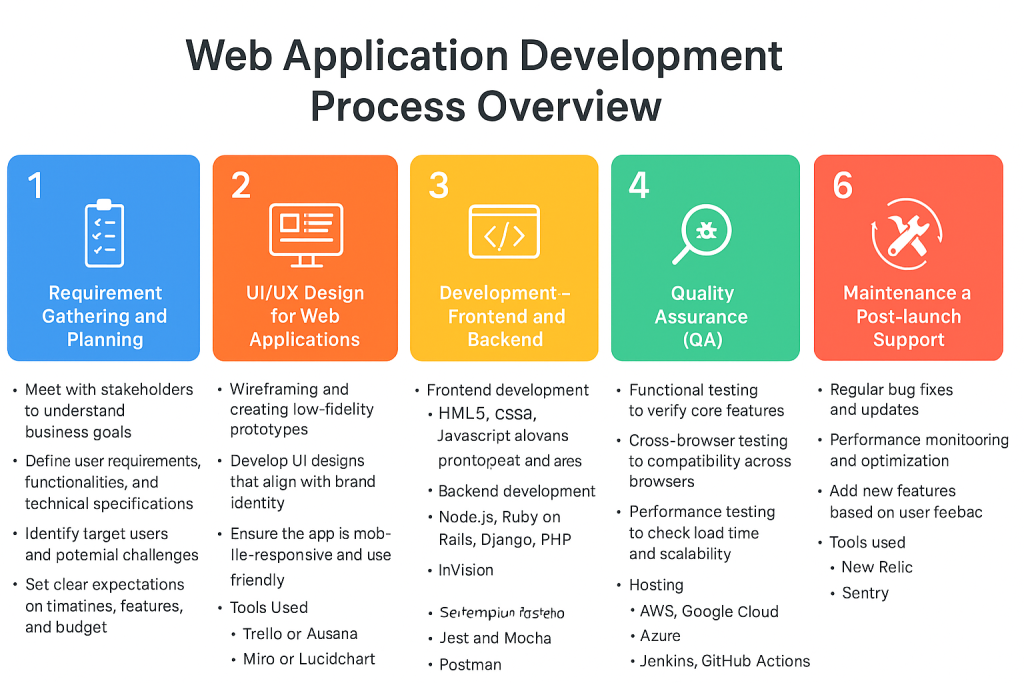
Step 1: Web Application Development Process – Requirement Gathering and Planning
The first stage of any web application development process is understanding the requirements. This step is crucial because it forms the foundation of the entire project.
Step 2: Tools for the Web Application Development Process
User Interface (UI) and User Experience (UX) design are critical to the success of a web application. This phase focuses on designing the look and feel of the application and ensuring that users have an intuitive and engaging experience.
💡Key Activities:
- Wireframing and creating low-fidelity prototypes.
- Develop UI designs that align with brand identity.
- Ensure the app is mobile-responsive and user-friendly.
💡Tools Used:
- Figma, Adobe XD, or Sketch for designing wireframes and UI.
- InVision for creating clickable prototypes.
Step 3: Development – Frontend and Backend
Disagreements are natural, but addressing them promptly and professionally is critical to maintaining a healthy partnership.
Once the design is approved, the development phase begins. This is where the actual application is built.
Frontend Development:
This is the client-facing part of the application, which users interact with directly. Technologies like HTML5, CSS3, and JavaScript (along with frameworks such as React or Angular) are used to create dynamic, responsive interfaces.Backend Development:
The backend involves creating the server-side logic, databases, and APIs to ensure the application runs smoothly. Technologies such as Node.js, Ruby on Rails, Django, and PHP are commonly used for backend development.
Step 4: Quality Assurance (QA)
Testing ensures that the application functions as expected, with no bugs or performance issues.
💡Key Activities:
- Functional testing to verify core features.
- Cross-browser testing to ensure compatibility across browsers.
- Performance testing to check load time and scalability.
💡Tools Used:
- Selenium for automation testing.
- Jest and Mocha for unit testing.
- Postman for testing API endpoints.
Step 5: Deployment and Hosting
Once testing is complete and bugs are fixed, the web application is ready for deployment. This phase involves hosting the application on a production server and making it accessible to users.
💡Key Activities:
- Set up hosting and cloud services (e.g., AWS, Google Cloud).
- Configure CI/CD pipelines for continuous deployment.
- Migrate databases and ensure security configurations are in place.
💡Tools Used:
- AWS, Google Cloud, Azure for hosting.
- Docker for containerization.
- Jenkins, GitHub Actions for continuous deployment.
Step 6: Maintenance and Post-launch Support
The development of a web application doesn’t end with deployment. Ongoing maintenance is required to ensure the app remains functional, secure, and up-to-date with user expectations.
💡Key Activities:
- Regular bug fixes and updates.
- Performance monitoring and optimization.
- Add new features based on user feedback.
💡Tools Used:
- New Relic for performance monitoring.
- Sentry for error tracking.
How to Get Started with Web Application Development
Getting started with web application development requires careful planning and a clear understanding of your goals. Here’s how you can begin:
Define Your Goals: Identify the purpose of your web application and the features you want to include.
Choose the Right Tools: Select the appropriate tools and technologies for frontend, backend, and databases.
Create a Plan: Plan the entire development process, from design to deployment.
Find the Right Development Partner: Work with a professional team, like SEA-Solutions, to ensure that your web application is developed effectively and efficiently.
FAQ: Common Questions About Web Applications
1. What frameworks are commonly used in web application development?
Some of the most popular frameworks for web application development include:
Frontend: React, Vue.js, Angular
Backend: Node.js, Ruby on Rails, Django, Express.js
Full-stack: MERN Stack (MongoDB, Express, React, Node.js), MEAN Stack (MongoDB, Express, Angular, Node.js)
These frameworks streamline the development process, offering built-in tools for scalability and security.
2. How does AI influence web application development?
AI technologies, including machine learning and natural language processing, are being integrated into web applications to enhance the user experience. For example:
Chatbots for customer service and user support.
Personalized recommendations (like those used in Netflix or Amazon).
Predictive search functionality that enhances user interaction.
These AI-powered features improve engagement, make apps more intuitive, and enhance user satisfaction.
3. How secure are web applications?
Security is a critical concern for web applications, and the level of security depends on how well the application is built and maintained. Common security practices for web applications include:
SSL encryption for secure data transmission.
Authentication mechanisms like OAuth, JWT (JSON Web Tokens), and two-factor authentication (2FA).
Regular security updates to address vulnerabilities.
Data encryption to protect sensitive user data in the database.
At SEA-Solutions, we ensure that security is a top priority throughout the entire development process, from design to deployment.
4. What technologies are used in developing web applications?
Web application development requires both frontend and backend technologies:
Frontend technologies: HTML5, CSS3, JavaScript, along with libraries like React, Vue.js, and frameworks like Angular.
Backend technologies: Node.js, Ruby on Rails, Django, Laravel for server-side logic and database management.
Databases: SQL (e.g., PostgreSQL, MySQL) or NoSQL (e.g., MongoDB).
DevOps: Tools like Docker, Kubernetes, AWS, and Google Cloud for deployment and infrastructure management.
4. How long does it take to develop a web application?
The development timeline for a web application depends on its complexity. A simple application might take a few months, while a more complex app with extensive features (e.g., e-commerce platforms, social media apps) can take anywhere from 6 months to over a year. The timeline also depends on factors like:
The number of features.
The complexity of design and user experience.
The number of platforms (web, mobile, etc.) the application will support.
5. What skills do I need to create a web application?
Creating a web application requires a variety of skills:
Frontend Development: Knowledge of HTML, CSS, JavaScript, and frameworks like React, Vue.js, or Angular.
Backend Development: Experience with Node.js, Ruby on Rails, or Django, and working with databases (e.g., MySQL, MongoDB).
Security: Understanding web security best practices (e.g., SSL encryption, OAuth authentication).
UI/UX Design: Creating user interfaces and ensuring good user experience using tools like Figma or Adobe XD.
DevOps: Familiarity with CI/CD pipelines, containerization tools like Docker, and cloud platforms like AWS.
6. How much does it cost to build a web application?
The cost of building a web application can vary significantly based on:
Scope and Complexity: A simple app may cost less than a complex app with custom features.
Team Size: The more developers and designers involved, the higher the cost.
Location of Developers: Rates differ depending on the geographic location of the development team.
At SEA-Solutions, we offer custom development solutions and can provide an estimate based on your specific requirements. Reach out to us for a tailored quote.
How SEA-Solutions Works with Web Application Development
At SEA-Solutions, we specialize in delivering custom web applications that meet the unique needs of your business. Our team follows a structured development process, utilizing the latest tools and technologies to build secure, scalable, and high-performing web applications. From planning and design to deployment and post-launch support, we ensure that your web app delivers the results you expect.
Learn more about our web application development services here
Related Articles You Might Find Helpful (to be updated)
- SEA-Solutions’ Web Application Development Process
- The Best Tools for Building High-Performance Web Applications
- Why Security Matters in Web Application Development
- How to Scale Your Web Application for Growth
- Case Studies: Successful Web Applications Developed by SEA-Solutions
The web application development process is a critical journey that requires careful planning, the right technologies, and experienced developers to bring a successful app to life. By following the right steps—from requirement gathering and design to development, deployment, and post-launch maintenance—you can ensure your web application is secure, scalable, and high-performing.
Whether you are building a simple web app or a complex enterprise solution, understanding the development process, tools, and best practices will help you make informed decisions and create a product that serves your business needs.
If you’re ready to take the next step in developing your web application, SEA-Solutions is here to help. With our proven development process, skilled team, and focus on delivering tailored solutions, we ensure your web application is built to succeed. Reach out to us today and let’s get started!
Learn more about our web application development services to see how we can help you create a high-performing, secure web application.
Tags:
web application development, web application process, web app development, custom web applications, best practices web development, tools for web apps, backend development, frontend development, scalable web applications, secure web applications, web development trends, SEA-Solutions, web app development services