
Optimizing Data Management & Reporting with Power BI
In today’s fast-paced business world, effective data management and timely reporting are critical for making informed, data-driven decisions. Power BI, Microsoft’s business intelligence tool, is designed to not only help businesses create custom reports but also to enhance the management and automation of business data. By optimizing data workflows, Power BI empowers organizations to make quicker, smarter decisions.
At SEA-Solutions, we specialize in helping businesses maximize their Power BI implementation, from data visualization to real-time reporting and automated workflows. In this post, we’ll explore how Power BI optimizes data management and reporting, and how SEA-Solutions ensures you leverage its full potential.
Table of Contents
Power BI and Data Management: A Comprehensive Overview
When businesses think of Power BI, they often focus on creating insightful reports. While Power BI is an exceptional tool for reporting, its true power lies in how it integrates, organizes, and manages data across the enterprise. By consolidating data from multiple sources into a unified platform, Power BI ensures that organizations can access accurate and actionable information quickly, enabling data-driven decision-making at all levels.
With Power BI, businesses can:
Centralize Data Access
Power BI allows organizations to bring together data from multiple platforms—such as CRM systems, ERP databases, cloud services, and Excel files—into one centralized location. This eliminates data silos, making it easier for teams across departments to collaborate effectively and ensuring that everyone works from a single source of truth. Centralized data access not only improves transparency but also increases confidence in the information being used for business decisions.
Enhance Data Consistency
With data coming from different sources, inconsistencies and errors can easily arise. Power BI helps maintain data consistency by validating and integrating disparate datasets, ensuring accuracy and uniformity across all departments. This consistency allows leadership to rely on data for strategic planning, operational efficiency, and performance monitoring.
Automate Data Workflows
Manual data processing can be time-consuming and prone to errors. Power BI, combined with Power Automate, allows businesses to automate data workflows. Examples include:
Automatically updating dashboards when new data is entered.
Sending alerts to teams when specific KPIs are met or exceeded.
Streamlining data preparation and cleansing tasks.
Automating these workflows not only reduces human error but also saves time, enabling employees to focus on analyzing insights rather than manually managing data. This level of automation ensures that reports and dashboards always reflect the most current and accurate information.
Unlock Actionable Insights
By centralizing, standardizing, and automating data processes, Power BI enables organizations to transform raw data into actionable insights. Businesses can monitor trends, detect anomalies, and make informed decisions in real-time. For example, sales teams can quickly identify underperforming regions, while finance teams can track budget deviations, all using a single interactive dashboard.
For a deeper understanding of how Power BI improves data management, check out our article on Power BI Analytics Services in Vietnam.
Real-Time Reporting with Power BI
Real-time reporting is one of the most impactful features of Power BI. In today’s business environment, having access to the most current data is crucial. Power BI, combined with Microsoft Dataverse, ensures that your reports and dashboards are updated in real-time, providing timely insights that help businesses stay agile and make quicker decisions.
The benefits of real-time reporting with Power BI include:
nstant Decision-Making: Have access to up-to-date information for immediate action.
Improved Forecasting: Make predictions based on the latest data trends.
Enhanced Operational Efficiency: Real-time data tracking allows businesses to quickly identify and resolve inefficiencies.
For more on real-time reporting and how it can benefit your business, explore our post on Streamlining Data Analytics with Microsoft Power BI.
Best Practices for Data Visualization in Power BI
Data visualization is more than just creating charts and graphs—it’s about telling a story with your data. In Power BI, effective visualizations allow businesses to quickly understand trends, identify patterns, and make data-driven decisions. However, poorly designed dashboards can confuse users and obscure key insights. Implementing best practices ensures that your visualizations are clear, actionable, and aligned with business goals.
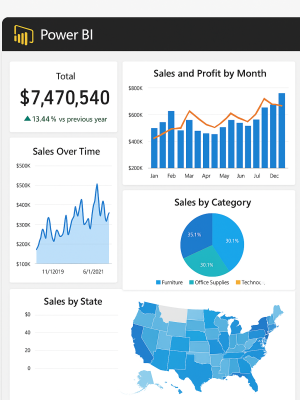
Key Best Practices for Power BI Data Visualization:
1. Define Your Objectives First
Before designing any dashboard or report, identify the purpose and the key questions it should answer. Are you tracking sales performance, monitoring operational efficiency, or analyzing customer behavior? Knowing your objectives ensures that the visuals are focused on the most relevant metrics, avoiding clutter or irrelevant information.
2. Choose the Right Visuals for the Data
Not all charts convey information equally. Use the appropriate visual for your data type:
Bar/Column charts for comparing quantities.
Line charts for trends over time.
Pie/donut charts for percentages and proportions.
Maps for geographical insights.
Tables for detailed numerical data.
Using the correct visual type ensures clarity and makes insights more intuitive.
3. Prioritize Simplicity and Clarity
Dashboards should be clean and easy to understand at a glance. Avoid overloading reports with too many visuals or excessive colors. Use consistent color schemes, labels, and formatting to help users focus on the key insights.
4. Use Interactive Features to Empower Users
Power BI allows interactive dashboards with slicers, filters, and drill-throughs. These features let users explore the data in depth, uncover patterns, and analyze metrics from multiple angles. Interactivity encourages engagement and empowers decision-makers to extract insights independently.
5. Highlight Key Metrics (KPIs)
Use visual cues, such as colors, shapes, or conditional formatting, to emphasize critical KPIs. Highlighting top-performing or underperforming metrics allows users to quickly identify areas of concern or success without having to search through data manually.
6. Maintain Consistency Across Reports
Consistency helps users navigate dashboards efficiently. Use uniform scales, fonts, color codes, and naming conventions across all reports. This creates a cohesive visual language that reduces cognitive load and makes dashboards easier to interpret.
7. Test for Readability and Accessibility
Ensure your dashboards are user-friendly for all roles, from executives to operational teams. Test reports on different devices (desktop, tablet, mobile) to make sure visuals are responsive and readable. Accessibility is key to ensuring that insights reach everyone who needs them.
8. Leverage Storytelling with Data
A dashboard should guide users through a narrative. Start with a high-level summary, then allow users to drill into details. Structure reports to answer the who, what, when, and why of the business data, transforming raw numbers into actionable insights.
Implementing these practices results in dashboards and reports that are not only visually appealing but also actionable. Decision-makers can quickly identify trends, detect anomalies, and make informed business decisions. Clear, interactive, and well-structured visualizations ensure that your Power BI reports drive business impact effectively.
For more guidance on creating impactful dashboards, see our related article on Power BI Best Practices: Unlock the Full Potential of Data Analytics and Visualization.
Power BI and Automation: Increasing Efficiency
Automation is an essential component of modern business operations. By integrating Power BI with Power Automate, businesses can automate routine tasks, such as refreshing reports, sending notifications, or triggering specific actions whenever new data is entered. This not only saves time but also ensures data accuracy and improves overall productivity.
The advantages of using Power Automate with Power BI include:
Automatic Report Generation
Automatically refresh and generate reports on a predefined schedule. For example, sales or finance teams can receive daily, weekly, or monthly dashboards without manual intervention. This ensures that stakeholders always have access to the latest insights and reduces the risk of outdated information affecting business decisions.
Data Synchronization
Ensure that data across multiple systems is updated simultaneously. By connecting various data sources—CRM, ERP, cloud databases, and internal spreadsheets—Power BI automatically consolidates data into a single platform. This improves consistency, eliminates data silos, and ensures all teams are working with the same accurate information.
Seamless Workflow Automation
Trigger actions like data validation, notifications, or report generation based on specific conditions. For example, if a sales target is reached, a notification can automatically be sent to the management team, or a follow-up report can be generated. This allows businesses to react faster to changing conditions, improving operational agility and efficiency.
Enhanced Efficiency and Accuracy
By automating repetitive tasks, employees can focus on analyzing insights rather than manually managing data. Automation reduces human error, increases reliability of reports, and speeds up the decision-making process. Businesses benefit from faster, more accurate, and actionable intelligence.
Why Choose SEA-Solutions for Power BI Implementation
At SEA-Solutions, we don’t just offer Power BI solutions—we provide customized strategies to ensure that Power BI meets the unique needs of your business. Our team of Power BI experts helps you not only create reports but also optimize data workflows, integrate data from various sources, and automate your reporting processes.
Here’s why SEA-Solutions should be your trusted partner for Power BI implementation:
Tailored Solutions: We work closely with your team to design a custom Power BI solution that aligns with your business goals and objectives.
Comprehensive Support: From initial consultation to full deployment and training, we provide end-to-end support throughout the process.
Expertise & Experience: With over 15 years in the industry, SEA-Solutions has successfully implemented Power BI solutions across various sectors, including finance, healthcare, and retail.
Data Security & Compliance: We ensure that all implementations meet high standards for data security and compliance.
Training & Empowerment: We provide training to ensure your team can fully leverage Power BI‘s capabilities.
Automation & Optimization: Beyond simple reporting, we optimize data workflows and automate processes, helping your business save time and improve efficiency.
To learn how SEA-Solutions can help you transform your business intelligence using Power BI, check out our blog on Power BI Analytics Services in Vietnam – SEA-Solutions.
Power BI is not just a reporting tool—it is a powerful solution for data management, real-time reporting, and business intelligence. By leveraging Power BI for data visualization, automating reporting processes, and centralizing data, businesses can enhance decision-making and improve operational efficiency.
At SEA-Solutions, we specialize in Power BI implementation and are committed to helping you get the most out of Power BI’s capabilities. From custom reports to automating workflows, we provide comprehensive solutions that drive growth and success for your business.
For further insights into Power BI, don’t forget to browse our other related articles:
Tags:
Power BI, Microsoft Power BI, Data Management, Reporting, Business Intelligence, Custom Reports, Power BI Analytics, Power BI Services, Power Automate, SEA-Solutions